Simplify Rehab,
Improve agility, reaction, and vertical jump.
Book a virtual demo
Join our QuickBoard community and enjoy a free 30-day trial demo – experience the technology trusted by top rehab and performance specialists.
Customers use Quick Board to track rehab progress, motivate patients, and enhance outcomes.
Some of our customers

Address Neuroplasticity

Automate Treatment

Motivate Patients

Providing the best physical therapy experience has its challenges.

lacking objective data

Time-Consuming Documentation

staff dependent to implement

Missing Neurocognitive Tasks
The Quick Board was developed to address these challenges and provide
patients with the best experience and outcomes.






Quick Board simplifies rehab and
boosts performance.
boosts performance.


Why Choose us?
No matter the size of your clinic or the specific needs of your patients, rehab and recovery can have its challenges.
It’s often difficult to assess agility, maintain patient motivation, and objectively track progress.
With Quick Board's proven methodology, you can simplify agility training, boost patient engagement, and enhance patient outcomes.
With Quick Board's proven methodology, you can simplify agility training, boost patient engagement, and enhance patient outcomes.







Products


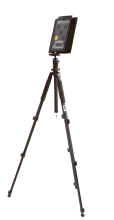
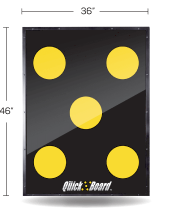
Software License
Available only on iPad (9th gen or later recommended).
Client Testimonials



“
The Quick Board is a game-changer for us. By tracking baseline data, we know if an athlete is trending in the right
direction AND if they need more attention in certain areas. We use this for concussion, knee, ankle, hip, core, and
shoulder rehab.
One of the best pieces of technology to assist in quantifying return to play readiness.
One of the best pieces of technology to assist in quantifying return to play readiness.
I have been using the Quick Board for a couple of years now and have not only seen great results, but I have seen
patient/athlete cooperation and compliance increase dramatically.
Our clinic applies Quick Board for stability and return to function, including returning to weight-bearing symmetry. The Quick Board allows patients to perform and re-educate the nervous system while providing feedback with scores and errors.
Overall, the Quick Board makes training athletes and rehabbing patients exciting, competitive, and fun.
Our clinic applies Quick Board for stability and return to function, including returning to weight-bearing symmetry. The Quick Board allows patients to perform and re-educate the nervous system while providing feedback with scores and errors.
Overall, the Quick Board makes training athletes and rehabbing patients exciting, competitive, and fun.
As a pioneer in the exciting new field of visual-cognitive-motor testing and training, I am keenly aware of the role that
eye to foot agility, quickness and accuracy plays in athletic success.
In my opinion, there is no finer technology than The Quick Board for enhancing or rehabilitating visual-cognitive-motor proficiency.
In my opinion, there is no finer technology than The Quick Board for enhancing or rehabilitating visual-cognitive-motor proficiency.
Quick Board has played a critical role in developing my pro tennis clients for the last 9 years. It allows me to identify
my athletes’ weaknesses and address them.
Quick Board has exceeded my expectations by increasing my athletes’ performance on the court and reducing their injuries.
Quick Board has exceeded my expectations by increasing my athletes’ performance on the court and reducing their injuries.